

You love your car’s dash. The screen fits perfectly, the knobs feel right and the menus control everything. The only thing missing is Apple CarPlay or Android Auto. You do not need to replace the screen. We add a small ZZ-2 module behind the dash, and CarPlay appears on the screen you already have.
Quick takeaway: Nothing on the outside changes. You keep the factory look and gain CarPlay.
This is Approach 3 of our four ways to modernize your dash.
How a ZZ-2 module works
Your phone connects to a hidden ZZ-2 module behind the dash. The module shows CarPlay or Android Auto on your factory screen, using video and touch signals made for your car. You switch between CarPlay and the factory menus at any time, using the touchscreen or the factory controller where your car supports it.
- We confirm your system. The right ZZ-2 module depends on your year and factory system.
- We install it behind the dash. No cutting, and the module plugs in with a vehicle-specific harness.
- We test everything. CarPlay, Android Auto, factory menus, cameras and sound.
Cars that can get a ZZ-2 module
ZZ-2 makes CarPlay and Android Auto interface modules for these brands and factory systems. Find your car below.
| Make | Factory system | Example ZZ-2 module |
|---|---|---|
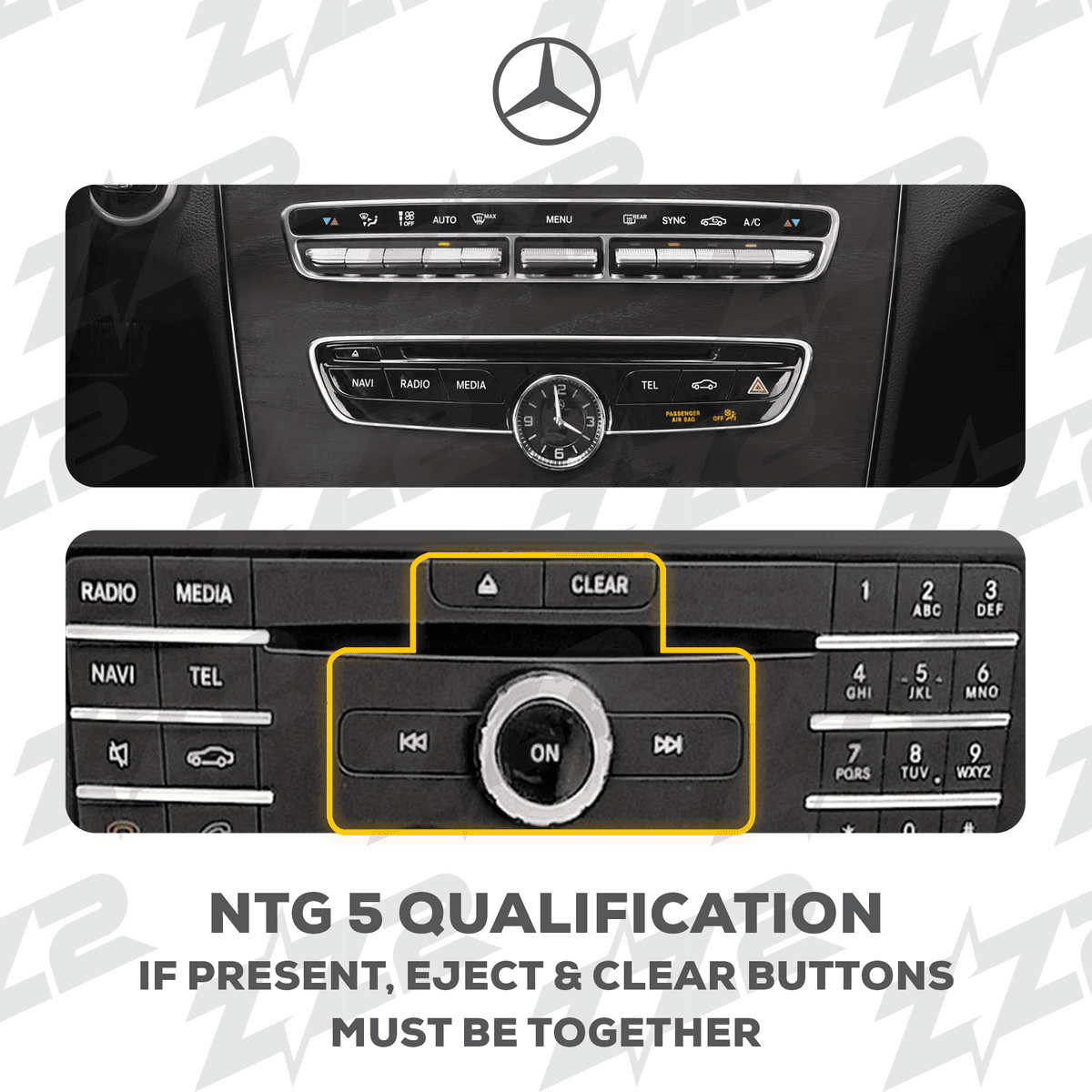
| Mercedes-Benz | NTG 3, NTG 3.5, NTG 4, NTG 4.5, NTG 5 and NTG 6 (including SLS) | IT3-NTG5, IT3-NTG45, ITZ-NTG6 |
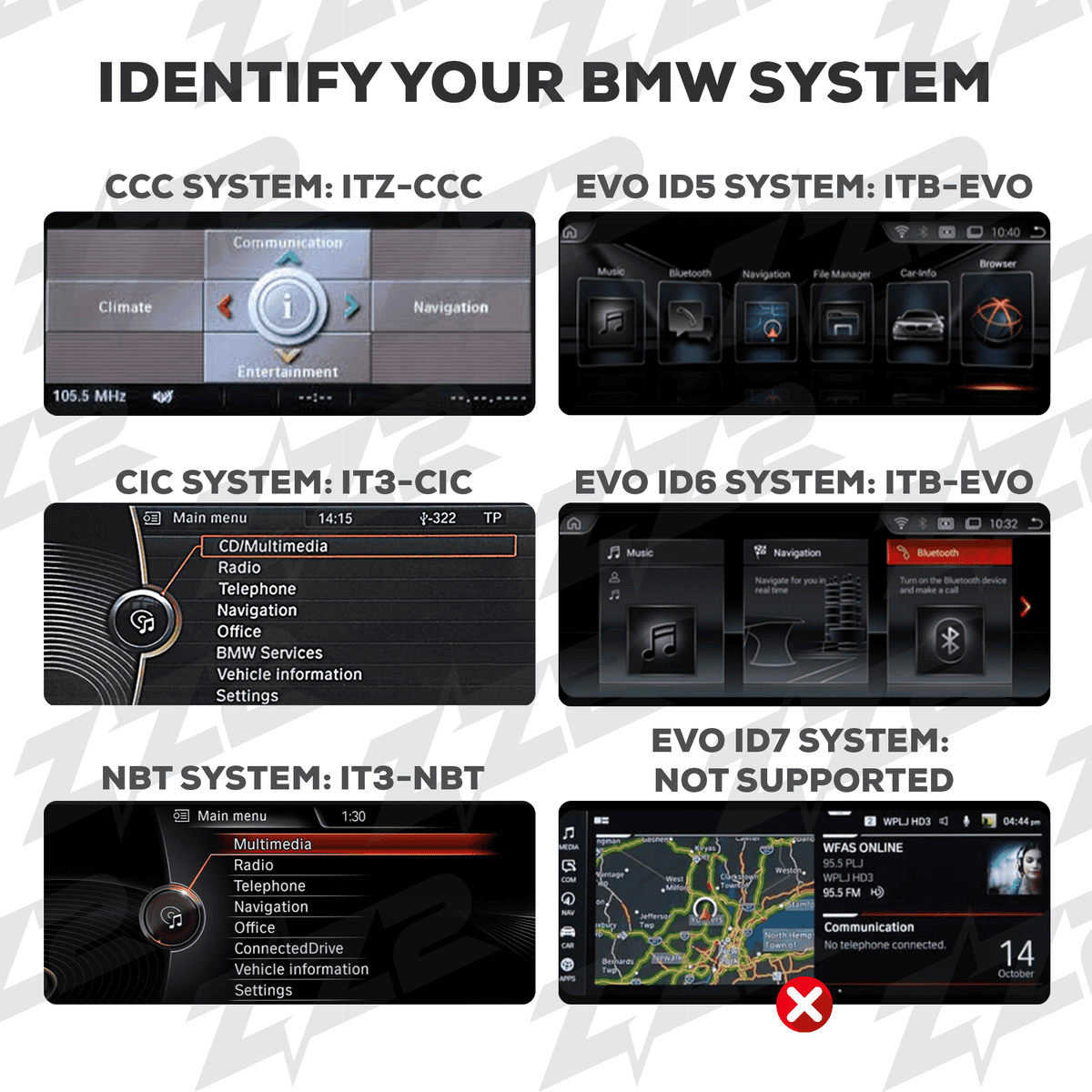
| BMW and Mini | CCC, CIC, NBT and EVO iDrive | IT3-CIC, IT3-NBT, ITB-EVO |
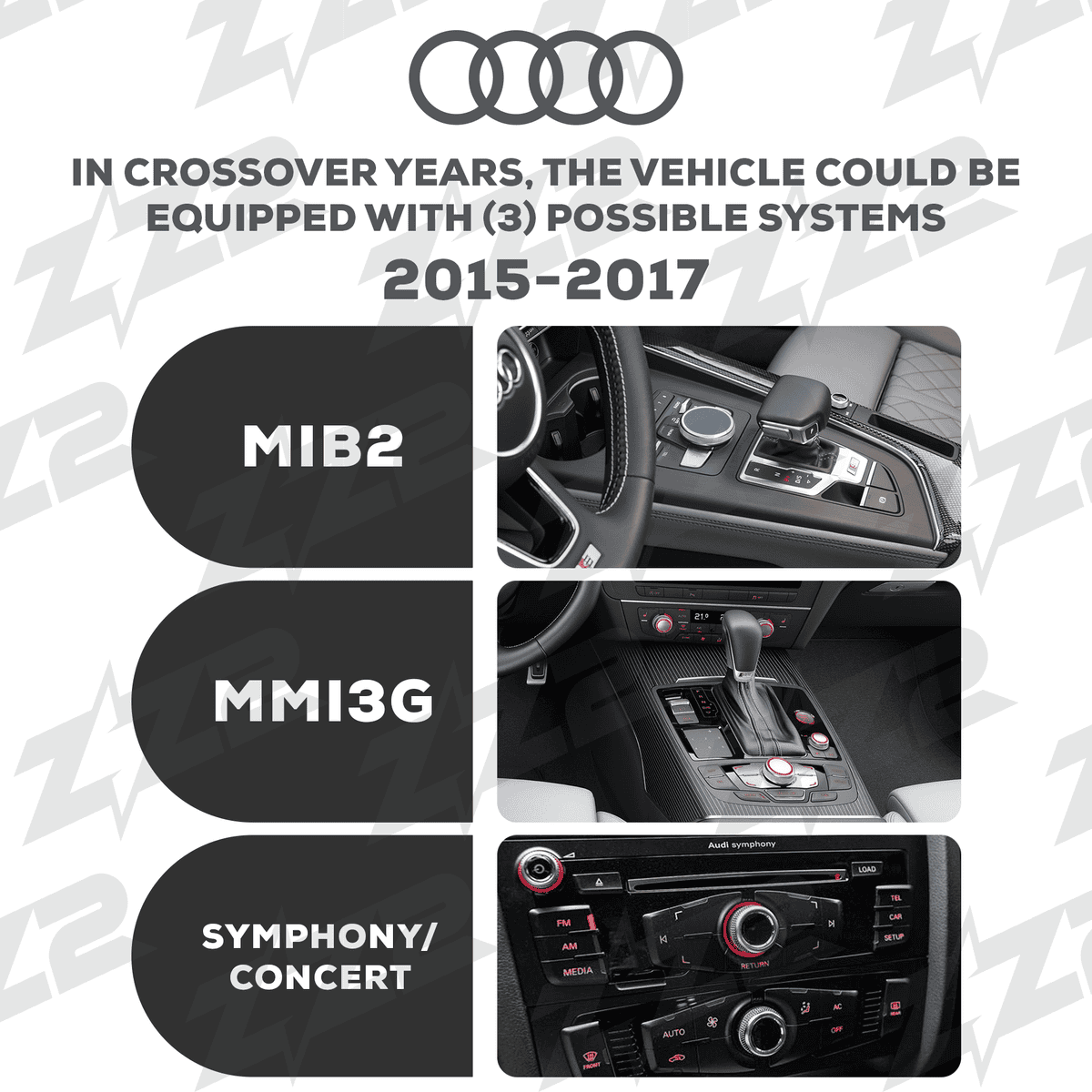
| Audi | MMI 3G, MIB2, Symphony and Concert (A4, A5, A6, A7, A8, Q3, Q5, Q7) | IT3-MMI3G, IT3-MIB2, IT3-SYM |
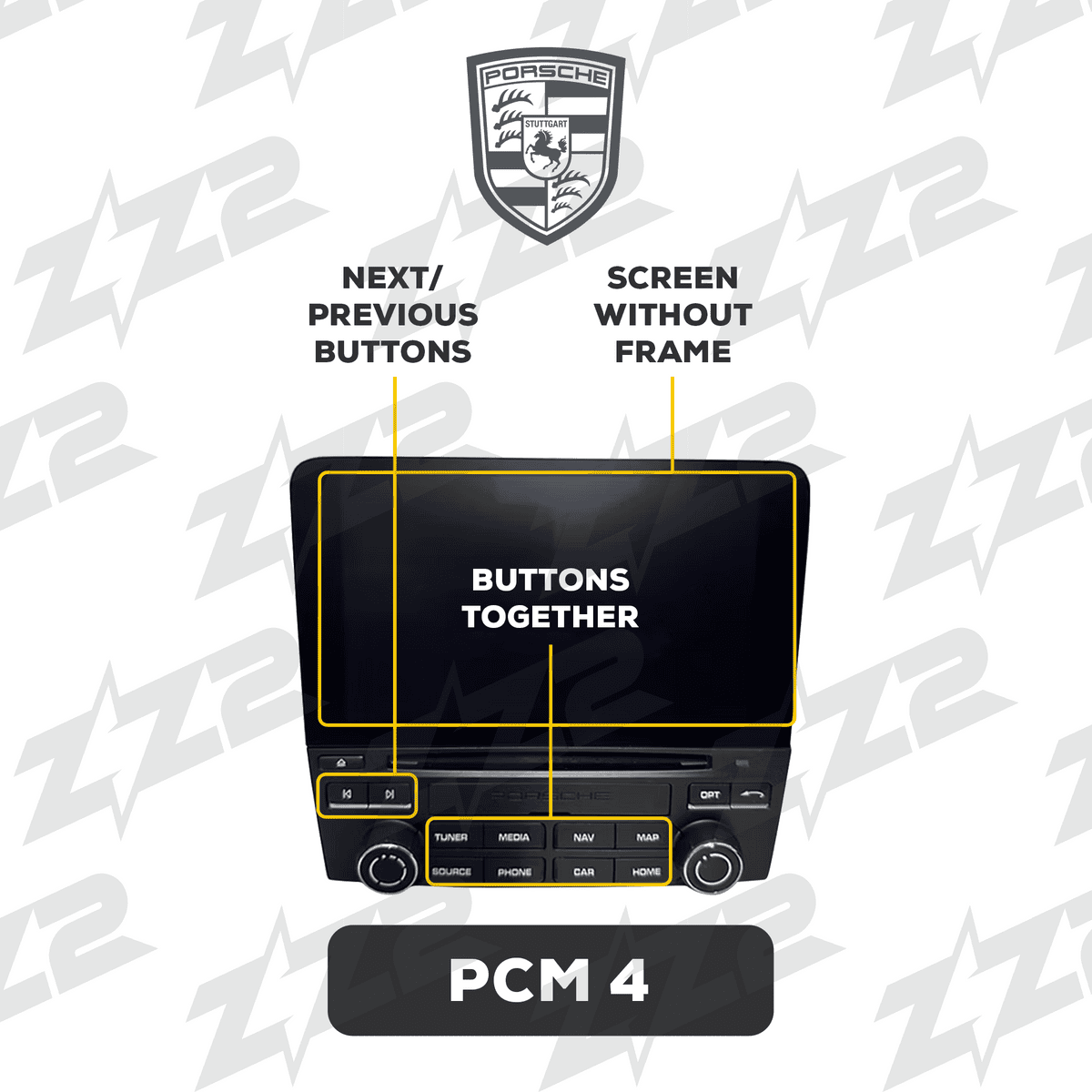
| Porsche | PCM 3, PCM 3.1, PCM 4 and CDR 31 | IT3-PCM31A, ITZ-PCM4-C, ITZ-CDR31-A |
| Volkswagen | MIB2 and MQB-platform models | IT3-MQB |
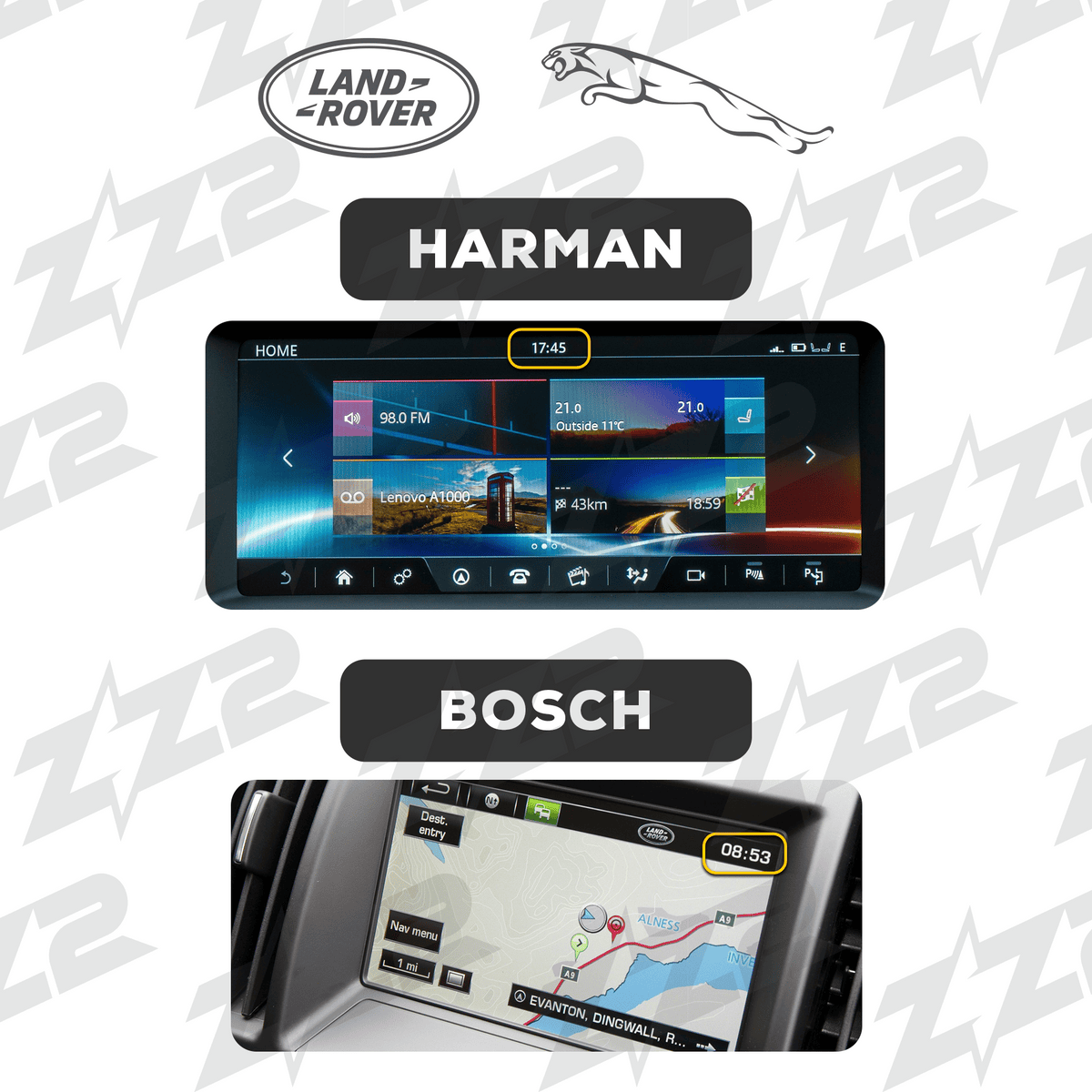
| Land Rover, Range Rover and Jaguar | Factory touchscreen systems, including models with factory navigation | ITZ-LRB, ITZ-LR12-C, ITZ-LR15T |
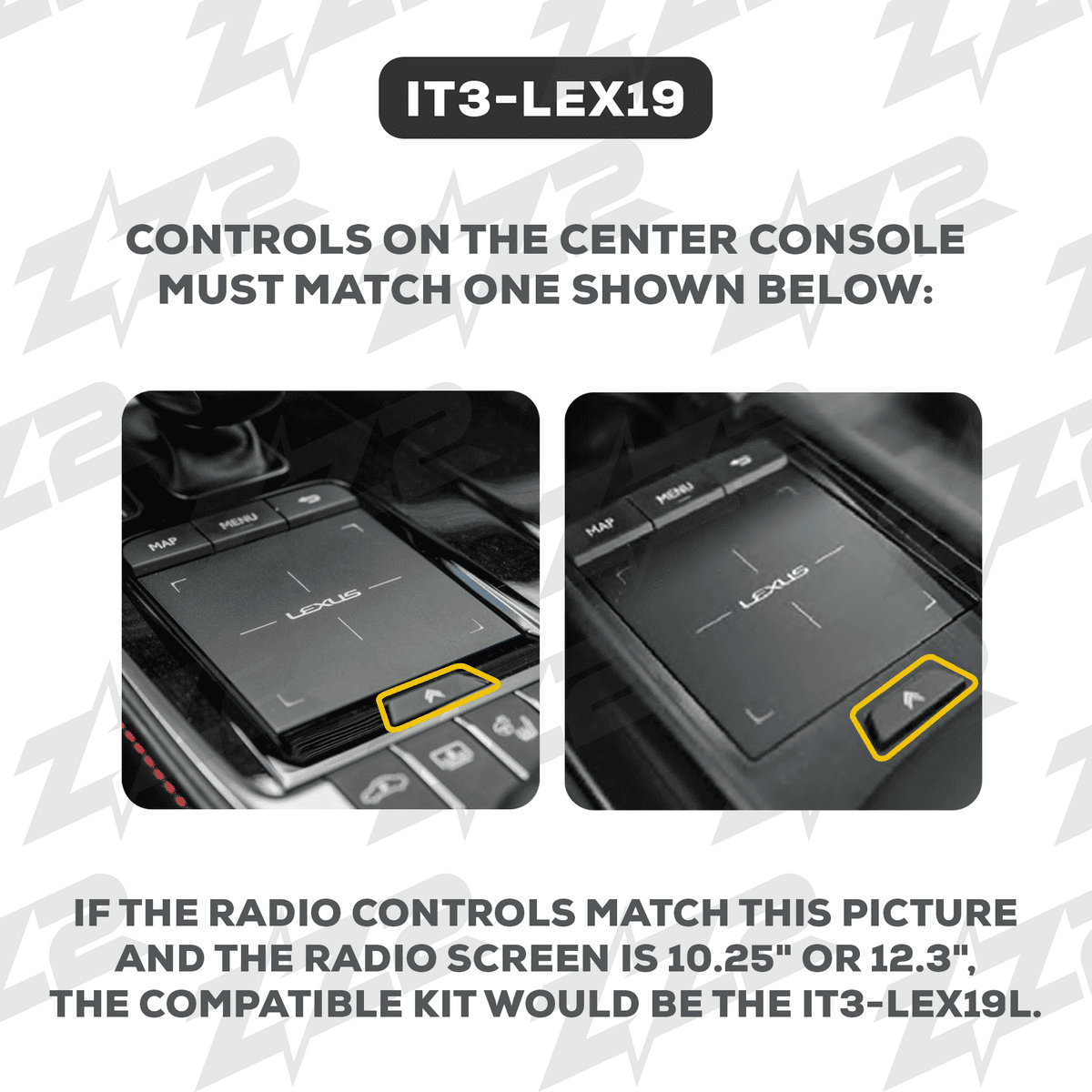
| Lexus | Factory screen with joystick or touchpad, including GX | IT3-LEX15, IT3-LEX17, IT3-LEX19, ITZ-GX1-A |
| Bentley | Factory navigation systems | ITZ-BNT |
| Ferrari | 458, 488, F12 and California | ITZ-458, ITZ-488/F12, ITZ-FCL |
| McLaren | Factory IRIS screen | ITZ-MCL |
| Maserati | Quattroporte and GranTurismo factory systems | ITZ-MAS-QTG |
| Volvo | Factory Sensus screen | IT3-VOLVO |
| Alfa Romeo | Factory screen | ITZ-ALFA-A |
| Ford and Lincoln | SYNC 2 | ITZ-SYNC2 |
| Honda and Acura | Factory screen | ITZ-HON, ITZ-ACH |
| Infiniti and Nissan | Q70 and select Nissan models | ITZ-Q70, ITZ-NIF |
| Jeep | Grand Cherokee | ITZ-JGC |
Support depends on your exact year and factory system. Call us at (951) 358-0516 with your year, make and model, and we will confirm the right module before you buy. You can also browse every module on the ZZ-2 website.
Identify your factory system
Each car brand uses its own factory system, and the right ZZ-2 module matches it. These charts help you see which one you have.
What you keep, and what you can add
You keep:
- The factory screen, dash and trim, exactly as they are
- Factory knobs, controller and steering-wheel buttons
- Vehicle settings, climate and menus that run through the screen
- Your factory premium sound system (Bose, Harman Kardon, Burmester and others)
You can add:
- Wireless Apple CarPlay and Android Auto
- Backup, front or 360-degree cameras
- DSP sound tuning for the factory system
- A wider HD screen built to fit the original dash, when you want more screen without losing the factory look
Other module brands we install for factory integration include BimmerTech, LinksWell and iDatalink Maestro, chosen to match your exact model.
What customers say
Rated 4.4 stars from 892 Google reviews, with 717 five-star reviews. See all our reviews on Google.
“Ramin and his team ordered my CarPlay Upgrade for my 2018 Infiniti QX80. Installed it in less than a day. Friendly and honest staff. Great service.” Hans M. · 5 stars
“They upgraded my audio system in my Mercedes G63 I’ve been driving the vehicle now for a few months and it totally modernized my driving experience with a sleek touch screen display.” Tra F. · 5 stars
“I got a back up camera installed to the stock touch screen sterio in my 2013 dodge charger and they did a great job.” C. F. · 5 stars
Frequently asked questions
Will the module change how my dash looks? No. It is hidden behind the dash. Nothing on the outside changes.
Can I still use the factory menus? Yes. You switch between CarPlay and the factory system at any time.
Is it wireless? Many ZZ-2 modules support wireless CarPlay and Android Auto. We confirm the right one for your car.
How long does it take? Usually less than a day, depending on the vehicle.
Related reading
- CarPlay and screen upgrades in Riverside: 4 ways to modernize your dash
- New Apple CarPlay stereo installation
- Apple CarPlay & Android Auto installation
Factory CarPlay integration in Riverside, CA
Advanced Car Stereo Riverside, 10555 Magnolia Ave, Riverside, CA 92505 · Call (951) 358-0516 · Contact us or book an appointment
Serving Riverside, Corona, Norco, Eastvale, Jurupa Valley, Moreno Valley, Los Angeles, Orange County and the Inland Empire.
Riverside’s go-to shop since 1991.


